Huawei
 - Devices
- Kodi
- Amazon Firestick
Good performance don't hurt with a VPN for Mac client that is smarter, secure and easier to configure.
Download VPN for Mac and join Ivacy’s ever-growing community of users.
Version: 6.2.0 (Updated on: 2025)Ivacy VPN comes highly recommended for plenty of reasons, but the most important reason of them all is because it is easy to setup and use. To benefit from Ivacy’s 5700+ servers in 100+ locations, just follow these 3 easy steps:

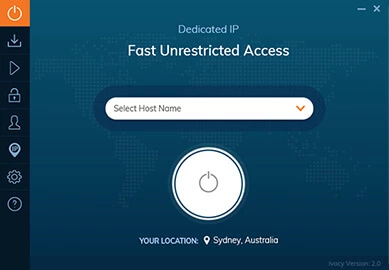
Access the app, select Smart Connect.

Select the Country or City you want to connect to.

Click Connect.
Our Mac VPN is a gift that keeps on giving. It has features that will make you online experience bigger and better. If you are still not convinced, then the following features will make you think otherwise.
Ivacy VPN for Mac makes acquiring privacy and security simple for everyone. Simply choose a purpose, and connect to the appropriate server for the experience you hope to achieve.
Unlike other VPNs, Ivacy VPN is not restrictive in any way. This applies to the amount of bandwidth available to you for your consumption. You get unlimited bandwidth to do whatever you want online.
Are you afraid your private and confidential information will fall in the wrong hands? There is no need for concern, as Ivacy has a no logs policy, which means anything you do online is not stored, nor is it misused.
For the best torrenting experience, you will need top notch upload and download speeds. This is possible with Ivacy’s P2P optimized servers, giving you the leverage you need to torrent to your heart’s content.
With an Ivacy VPN subscription, you can protect up to 10 devices simultaneously. Not only are all your devices protected, but they will benefit from an unrestricted internet. Separate subscriptions will not be required.
After connecting an Ivacy VPN server, you can rest easy knowing you are in safe hands. Connectivity issues will be a thing of the past. You will get superior connection reliability unlike anything you have seen before.

DNS leaks can happen if the request (the IP address linked with that URL) goes through your ISP's DNS rather than the VPN tunnel. Ivacy VPN encrypts that channel.

DDoS attacks are malicious in nature that can disrupt your Internet Traffic as well as can overwhelm your traffic so much that the infrastructure cracks. Ivacy prevents DDoS.
If you have a Mac, then you should use Ivacy VPN without thinking twice. Why? Because Ivacy is packed to the brim with all those features you will need for a seamless and safe online experience. The dedicated app for Mac will allow you to accomplish a lot more with little to no effort. Never again will you have to worry about tweaking settings manually.
To get the Ivacy Mac client, all you need to do is to subscribe to a plan that fits your needs and requirements. Do keep in mind though, the longer the plan, the greater the savings!
I have been a user of @IvacyVPN for a couple of years. Never have I faced an issue that wasn't resolved ASAP...
@IvacyVPN is exceptionally fantastic. Especially the purpose feature where you can unblock #Netflix , BBC , #Disney etc...
@IvacyVPN Thanks for showing me how to unblock #Disney+ outside my home country. You guys are lifesavers. :D
With a global network of 5700+ VPN servers in 100+ locations, Ivacy VPN protects your Internet privacy by replacing your real IP
address with one of its 300,000+ shared IPs from around the world. Here are a few frequently asked questions by our awesome users.
You can setup best vpn for mac client a VPN for Mac in a few easy steps. All you need to do is, chose the Apple menu and then go to System Preferences. Click Network now and then Add on the left. Click on the pop-up menu and select VPN. Click on the VPN menu and select the kind of VPN connection you need to setup with respect to the Network you need to connect to.
To setup vpn on mac click on the Apple menu and select System Preferences. Then, click on Network or the WI-FI icon on the menu bar and then click on Open Network Preferences. Now, click on the + button at the bottom left corner and select VPN.
It is not illegal to use a VPN except a select few countries including Turkey, China and UAE. However, anything illegal done with the help of a VPN remains illegal; for instance, the download of objectionable content or any content that is copyright protected.
You can easily use a free VPN with Mac and the process to install it remains the same as it would be for a paid VPN service. However, it is worth noting that a free VPN can not guarantee safety and protection in the same way as a reliable paid VPN. You could, however, take Ivacy VPN for a test drive with our 7 day VPN trial.
If you pick the correct service, using a VPN on Mac is completely secure. Consider the number of servers and locations, connection speed, additional security measures, and the app's evaluations. Also, be certain that the service does not collect or sell your information to third parties. Avoiding free VPN software is the easiest way to accomplish this.
Ivacy app is available on Android, iOS and Huawei